레이블이 detectNet인 게시물을 표시합니다. 모든 게시물 표시

2020년 6월 7일 일요일

Jetson Nano - DE⫶TR: vs NVIDIA DNN vision library(detectNet)

Wednesday, December 18, I've described object detection in NVidia's vision libeary in another blog.
<object detection using the NVidia DNN vision library>


In this post, we will compare the performance and accuracy of Facebook's DETR and NVidia's DNN vision libeary described in the previous article. However, there are some restrictions.
Direct network performance comparison is difficult because the network model supported by NVidai detectNet and the model supported by DETR are different.

  supported models
 NVidia detectNet
 ssd-mobilenet-v2, ssd-inception-v2, pednet, multiped, facenet, coco-airplane, coco-chair, coco-dog
 FaceBook DETR
 detr_resnet50, detr_resnet50_dc5, detr_resnet50_dc5_panoptic, detr_resnet50_panoptic, detr_resnet101, detr_resnet101_dc5, detr_resnet101_dc5_panoptic, detr_resnet101_panoptic

For testing, NVidia detectNet used ssd-mobilenet and DETR used detr_resnet50. For the inference image to be used for testing, some of the images provided with detectnet were used. "https://spyjetson.blogspot.com/2019/12/jetsonnano-hello-ai-world-nvidia-dnn.html" explains how to install the NVidia DNN vision library.

Test codes

I will proceed with the test in the following order.
  • Create the "/usr/local/src/test_images" directory in advance, then copy the test image described above. 52 files were used for the test.
  • The finished files will be stored in "/usr/local/src/result".
  • The file name format to save is "Original File Name + Model Name + FPS".
  • It doesn't matter which of the two models you test first.
  • It works on all jpg files in the directory containing the original inference image and saves the resulting image.

The following code is a modification of the detr.py code I created while describing DETR in the previous blog.

import torch as th
import torchvision
import torchvision.transforms as T
import requests, sys, time, os
from PIL import Image, ImageDraw, ImageFont
import argparse
import gc 

print('pytorch', th.__version__)
print('torchvision', torchvision.__version__)

parser = argparse.ArgumentParser()
parser.add_argument('--model', type=str, default="resnet50", help='network model -> resnet50 or resnet101 or resnet50_dc5 or  resnet50_panoptic')
parser.add_argument("--threshold", type=float, default=0.7, help="minimum detection threshold to use")
args = parser.parse_args()

'''
#if you want to view supported models, use these codes.
name = th.hub.list('facebookresearch/detr');
print(name)
'''
if args.model == 'resnet50':
    model = th.hub.load('facebookresearch/detr', 'detr_resnet50', pretrained=True)
elif args.model == 'resnet50_dc5':
    model = th.hub.load('facebookresearch/detr', 'detr_resnet50_dc5', pretrained=True)
elif args.model == 'resnet50_dc5_panoptic':
    model = th.hub.load('facebookresearch/detr', 'detr_resnet50_dc5_panoptic', pretrained=True)
elif args.model == 'resnet50_panoptic':
    model = th.hub.load('facebookresearch/detr', 'detr_resnet50_panoptic', pretrained=True)

elif args.model == 'resnet101':
    model = th.hub.load('facebookresearch/detr', 'detr_resnet101', pretrained=True)
elif args.model == 'resnet101_dc5':
    model = th.hub.load('facebookresearch/detr', 'detr_resnet101_dc5', pretrained=True)
elif args.model == 'resnet101_dc5_panoptic':
    model = th.hub.load('facebookresearch/detr', 'detr_resnet101_dc5_panoptic', pretrained=True)
elif args.model == 'resnet101_panoptic':
    model = th.hub.load('facebookresearch/detr', 'detr_resnet101_panoptic', pretrained=True)
    
else:    
    print('Unknown network name[%s]'%(args.model))
    sys.exit(0)

t1 = time.time()    
model.eval()
model = model.cuda()
print('model[%s] load success'%args.model)
t2 = time.time()
print("======== Network Load time:%f"%(t2 - t1))


transform = T.Compose([
    T.ToTensor(),
    T.Normalize([0.485, 0.456, 0.406], [0.229, 0.224, 0.225])
])
CLASSES = [
    'N/A', 'person', 'bicycle', 'car', 'motorcycle', 'airplane', 'bus',
    'train', 'truck', 'boat', 'traffic light', 'fire hydrant', 'N/A',
    'stop sign', 'parking meter', 'bench', 'bird', 'cat', 'dog', 'horse',
    'sheep', 'cow', 'elephant', 'bear', 'zebra', 'giraffe', 'N/A', 'backpack',
    'umbrella', 'N/A', 'N/A', 'handbag', 'tie', 'suitcase', 'frisbee', 'skis',
    'snowboard', 'sports ball', 'kite', 'baseball bat', 'baseball glove',
    'skateboard', 'surfboard', 'tennis racket', 'bottle', 'N/A', 'wine glass',
    'cup', 'fork', 'knife', 'spoon', 'bowl', 'banana', 'apple', 'sandwich',
    'orange', 'broccoli', 'carrot', 'hot dog', 'pizza', 'donut', 'cake',
    'chair', 'couch', 'potted plant', 'bed', 'N/A', 'dining table', 'N/A',
    'N/A', 'toilet', 'N/A', 'tv', 'laptop', 'mouse', 'remote', 'keyboard',
    'cell phone', 'microwave', 'oven', 'toaster', 'sink', 'refrigerator', 'N/A',
    'book', 'clock', 'vase', 'scissors', 'teddy bear', 'hair drier',
    'toothbrush'
]
COLORS = [(0, 45, 74, 127), (85, 32, 98, 127), (93, 69, 12, 127),
          (49, 18, 55, 127), (46, 67, 18, 127), (30, 74, 93, 127)]
          
src_path = '/usr/local/src/test_images'
dest_path = '/usr/local/src/result'

fnt = ImageFont.truetype('/usr/share/fonts/truetype/dejavu/DejaVuSansMono.ttf', 16)
fnt2 = ImageFont.truetype('/usr/share/fonts/truetype/dejavu/DejaVuSans-Bold.ttf', 30)


for root, dirs, files in os.walk(src_path):
    for fname in files:
        gc.collect()
        full_fname = os.path.join(root, fname)
        img = Image.open(full_fname).convert('RGB')
        W, H = img.size
        t1 = time.time()
        img_tens = transform(img).unsqueeze(0).cuda()

        fps_time  = time.perf_counter()
        with th.no_grad():
          output = model(img_tens)

        elapsed = time.time() - t1
        fps = 1.0 / elapsed
        print("FPS:%f"%(fps))


        im2 = img.copy()
        drw = ImageDraw.Draw(im2, 'RGBA')
        pred_logits=output['pred_logits'][0]
        pred_boxes=output['pred_boxes'][0]

        color_index = 0
        for logits, box in zip(pred_logits, pred_boxes):
            m = th.nn.Softmax(dim=0)
            prob = m(logits)
            top3 = th.topk(logits, 3)
            if top3.indices[0] >= len(CLASSES) or prob[top3.indices[0]] < args.threshold:
                continue
              
            print(' ===== print top3 values =====')
            print('top3', top3)

            print('top 1: Label[%-20s]  probability[%5.3f]'%(CLASSES[top3.indices[0]], prob[top3.indices[0]] * 100))

            if top3.indices[1] < len(CLASSES) :
                print('top 2: Label[%-20s]  probability[%5.3f]'%(CLASSES[top3.indices[1]], prob[top3.indices[1]] * 100))

            if top3.indices[2] < len(CLASSES) :
                print('top 3: Label[%-20s]  probability[%5.3f]'%(CLASSES[top3.indices[2]], prob[top3.indices[2]] * 100))
            
            
            cls = top3.indices[0]
            label = '%s-%4.2f'%(CLASSES[cls], prob[cls] * 100 )
            print(label)
            box = box.cpu() * th.Tensor([W, H, W, H])
            x, y, w, h = box
            x0, x1 = x-w//2, x+w//2
            y0, y1 = y-h//2, y+h//2
            color = COLORS[color_index % len(COLORS)]
            color_index += 1            
            drw.rectangle([x0, y0, x1, y1], fill = color, width=5)
            drw.text((x, y), label, font=fnt,fill='white')
            
        output = None
        th.cuda.empty_cache()
        
        drw.text((5, 5), 'FPS-%4.2f'%(fps), font=fnt2,fill='green')
        s = os.path.splitext(fname)[0]
        out_name = os.path.join(dest_path, s + '_detr_%s_%4.2f.jpg'%(args.model, fps))
        im2.save(out_name)   
<detr_dir.py>


The following code is a modification of the detectnet-console.py code created while describing the previous detectNet.

#!/usr/bin/python3
#
# Copyright (c) 2019, NVIDIA CORPORATION. All rights reserved.
#
# Permission is hereby granted, free of charge, to any person obtaining a
# copy of this software and associated documentation files (the "Software"),
# to deal in the Software without restriction, including without limitation
# the rights to use, copy, modify, merge, publish, distribute, sublicense,
# and/or sell copies of the Software, and to permit persons to whom the
# Software is furnished to do so, subject to the following conditions:
#
# The above copyright notice and this permission notice shall be included in
# all copies or substantial portions of the Software.
#
# THE SOFTWARE IS PROVIDED "AS IS", WITHOUT WARRANTY OF ANY KIND, EXPRESS OR
# IMPLIED, INCLUDING BUT NOT LIMITED TO THE WARRANTIES OF MERCHANTABILITY,
# FITNESS FOR A PARTICULAR PURPOSE AND NONINFRINGEMENT.  IN NO EVENT SHALL
# THE AUTHORS OR COPYRIGHT HOLDERS BE LIABLE FOR ANY CLAIM, DAMAGES OR OTHER
# LIABILITY, WHETHER IN AN ACTION OF CONTRACT, TORT OR OTHERWISE, ARISING
# FROM, OUT OF OR IN CONNECTION WITH THE SOFTWARE OR THE USE OR OTHER
# DEALINGS IN THE SOFTWARE.
#

import jetson.inference
import jetson.utils

import argparse
import sys, time, os

# parse the command line
parser = argparse.ArgumentParser(description="Locate objects in an image using an object detection DNN.", 
						   formatter_class=argparse.RawTextHelpFormatter, epilog=jetson.inference.detectNet.Usage())

parser.add_argument("--network", type=str, default="ssd-mobilenet-v2", help="pre-trained model to load (see below for options)")
parser.add_argument("--overlay", type=str, default="box,labels,conf", help="detection overlay flags (e.g. --overlay=box,labels,conf)\nvalid combinations are:  'box', 'labels', 'conf', 'none'")
parser.add_argument("--threshold", type=float, default=0.5, help="minimum detection threshold to use")

try:
	opt = parser.parse_known_args()[0]
except:
	print("")
	parser.print_help()
	sys.exit(0)


# load the object detection network
t1 = time.time()
net = jetson.inference.detectNet(opt.network, sys.argv, opt.threshold)
t2 = time.time()
print("======== Network Load time:%f"%(t2 - t1))


src_path = '/usr/local/src/test_images'
dest_path = '/usr/local/src/result'

for root, dirs, files in os.walk(src_path):
    for fname in files:
        full_fname = os.path.join(root, fname)
        img, width, height = jetson.utils.loadImageRGBA(full_fname)
        t1 = time.time()
        detections = net.Detect(img, width, height, opt.overlay)
        elapsed = time.time() - t1
        # print the detections
        print("detected {:d} objects in image".format(len(detections)))
        fps = 1.0 / elapsed
        print("FPS:%f"%(fps))
        for detection in detections:
            print(detection)

        # print out timing info
        net.PrintProfilerTimes()

        # save the output image with the bounding box overlays
        s = os.path.splitext(fname)[0]
        out_name = os.path.join(dest_path, s + '_detectnet_%s_%4.2f.jpg'%(opt.network, fps))
        jetson.utils.saveImageRGBA(out_name, img, width, height)
<detectnet_dir.py>


Test Results

Performance

When it comes to recognition speed, NVidia's detectNet is overwhelming. While the speed of detectNet using ssd-mobilenet-v2 recorded more than 20FPS, DETR using resnet50 only recorded 0.X or 1.X FPS.
<There is an FPS value at the end of the resulting file name.>

Accuracy

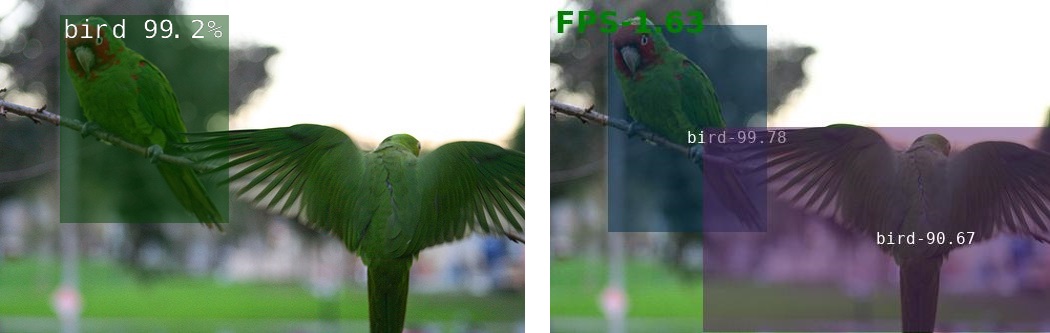
The following is a comparison of some of the test results.  The left image is the result of using detectnet and the right image is DETR.
<bird_2.jpg>


<dog_0.jpg>


<dog_3.jpg>


<peds_3.jpg>

Overall, DETR's perception seems to be more accurate. However, in the case of DETR, the overlapping recognition part is sometimes noticeable. Even in the case of peds_3.jpg, it can be confirmed that the suitcase was repeatedly recognized.

In the following picture, you can see that the words are recognized again.

<horse_2.jpg>


Wrapping up

Because the ssd-mobilenet-v2 is lighter than the resnet-50 model, it is difficult to evaluate that DETR is slow only by the above comparison. However, considering the limited model currently available in the Jetson Nano, the slow processing speed of DETR, which requires the use of resnet50 in object detection, is a problem.
In the future, I expect DETR to continue developing and improving models suitable for small devices such as Jetson Nano.

You can download the source code and image files at https://github.com/raspberry-pi-maker/NVIDIA-Jetson .


2020년 6월 5일 금요일

Jetson Nano - DE⫶TR: End-to-End Object Detection with Transformers

On May 27, 2020, Facebook announced a new framework called DETR, (DEtection TRansformer). The computer vision area is very important in edge AI computing. I have also introduced many Pose Estimation and Object Detection models available in the Jetson series.

Transformers are a deep learning architecture that has gained popularity in recent years, particularly on problems with sequential data such as natural language processing (NLP) tasks like language modelling and machine translation.
Transformers have also been extended to tasks such as speech recognition, symbolic mathematics, and reinforcement learning. However, in the computer vision field, the model using Transformer is the first DeTR released by Facebook.

To be honest, I have no deep knowledge of deep learning theory. And I don't want to discuss the structure of DeTR in this article. My interest is what DeTR does in the Edge AI computing. It is this picture that draws my attention.


DETR has a much simpler structure than R-CNN, which was used for traditional object recognition. As the structure is simple, it can be predicted that the processing speed will also increase. In Edge AI computing, processing speed is a very important part. Improving processing speed through the use of lightweight models on edge devices that do not have sufficient computing power and GPUs, such as the Jetson Nano, is an important factor in deciding whether or not a model can be used.

Facebook researchers who unveiled the DETR model say that DETR is similar to Fast-RCNN. However, there is a drawback in that the recognition rate for small images is low.

“Current detectors required several years of improvements to cope with similar issues, and we expect future work to successfully address them for DETR,” the paper authors wrote.

I think these shortcomings will be gradually overcome in the future. DETR is an object recognition model with a completely different structure than before, so it is a model that many AI experts are interested in. Therefore, a model of improved performance at a rapid speed may be continuously released.

The official paper on DETR can be found at https://arxiv.org/pdf/2005.12872.pdf. And the github page is https://github.com/facebookresearch/detr.


Prerequisites


DETR requires PyTorch 1.5. To use PyTorch 1.5 on Jetson Nano, JetPack 4.4 or later is required. How to install JetPack 4.4 and PyTorch 1.5 was introduced in a previous blog. See the previous blog and prepare JetPack 4.4 and PyTorch 1.5 in advance.
Currently (2020.06.05) I am using JetPack 4.4 Developer Preview (DP) Version.

Models

Facebook offers already built DETR models. The following are the models introduced on github.These models can be downloaded in advance and used in real time. If the current user account is root, real-time download stores the model in /root/.cache/torch/hub/facebookresearch_detr_master.

Model Zoo

We provide baseline DETR and DETR-DC5 models, and plan to include more in future. AP is computed on COCO 2017 val5k, and inference time is over the first 100 val5k COCO images, with torchscript transformer.


name backbone schedule inf_time box AP url size
0 DETR R50 500 0.036 42.0 download 159Mb
1 DETR-DC5 R50 500 0.083 43.3 download 159Mb
2 DETR R101 500 0.050 43.5 download 232Mb
3 DETR-DC5 R101 500 0.097 44.9 download 232Mb

COCO val5k evaluation results can be found in this gist.

COCO panoptic val5k models:


name backbone box AP segm AP PQ url size
0 DETR R50 38.8 31.1 43.4 download 165Mb
1 DETR-DC5 R50 40.2 31.9 44.6 download 165Mb
2 DETR R101 40.1 33 45.1 download 237Mb

The models are also available via torch hub, to load DETR R50 with pretrained weights simply do:

model = torch.hub.load('facebookresearch/detr', 'detr_resnet50', pretrained=True)


Using models in the github repo

The torch.hub.load function fetches the model in real time from the github repo. Using this function saves the model in the /root/.cache/torch/hub/facebookresearch_detr_master directory. Once downloaded, the second call uses the already downloaded model.

Let's take a quick look at the torch.hub.load function.

torch.hub.load(github, model, *args, **kwargs)[source]

Load a model from a github repo, with pretrained weights.

Parameters
  • github (string) – a string with format “repo_owner/repo_name[:tag_name]” with an optional tag/branch. The default branch is master if not specified. Example: ‘pytorch/vision[:hub]’

  • model (string) – a string of entrypoint name defined in repo’s hubconf.py

  • *args (optional) – the corresponding args for callable model.

  • force_reload (bool, optional) – whether to force a fresh download of github repo unconditionally. Default is False.

  • verbose (bool, optional) – If False, mute messages about hitting local caches. Note that the message about first download is cannot be muted. Default is True.

  • **kwargs (optional) – the corresponding kwargs for callable model.

Returns

a single model with corresponding pretrained weights.

Example

>>> model = torch.hub.load('pytorch/vision', 'resnet50', pretrained=True)

We will use'facebookresearch/detr' as the first parameter. Given that this value is github, it can be interpreted as github.com/facebookresearch/detr. In other words, it will be the name of the official github site of the DETR mentioned earlier.
The second parameter is the model name, and the values ​​of detr_resnet50, detr_resnet50_dc5, detr_resnet101, detr_resnet101_dc5, ... can be used.  How do you know these values?  These values ​​are answered in the hubconf.py file on the github page. The github that provides the repo must provide this file. If you open this file, you can see the code to find where the actual model file (pth) file is stored and downlaod the model if not exists on the .cache directory. using the name of each model.


Test DETR

Yannic Kilcher made an excellent sample codes. You can find his jupyter notebook codes at https://colab.research.google.com/drive/1Exoc3-A141_h8GKk-B6cJxoidJsgOZOZ?usp=sharing.

And you can find his Youtube video at https://youtu.be/LfUsGv-ESbc.


I modified Yannic Kilcher's code to improve the inference image size and network model selection. And the performance was output on the image.


import torch as th
import torchvision
import torchvision.transforms as T
import requests, sys, time, os
from PIL import Image, ImageDraw, ImageFont
import argparse
import gc 

print('pytorch', th.__version__)
print('torchvision', torchvision.__version__)

parser = argparse.ArgumentParser()
parser.add_argument('--file', type=str, default="", help='filename to load')
parser.add_argument('--model', type=str, default="resnet50", help='network model -> resnet50 or resnet101 or resnet50_dc5 or  resnet50_panoptic')
parser.add_argument("--size", type=str, default='300X200', help="inference size")
parser.add_argument("--threshold", type=float, default=0.7, help="minimum detection threshold to use") args = parser.parse_args() ''' #if you want to view supported models, use these codes. name = th.hub.list('facebookresearch/detr'); print(name) ''' if args.model == 'resnet50': model = th.hub.load('facebookresearch/detr', 'detr_resnet50', pretrained=True) elif args.model == 'resnet50_dc5': model = th.hub.load('facebookresearch/detr', 'detr_resnet50_dc5', pretrained=True) elif args.model == 'resnet50_dc5_panoptic': model = th.hub.load('facebookresearch/detr', 'detr_resnet50_dc5_panoptic', pretrained=True) elif args.model == 'resnet50_panoptic': model = th.hub.load('facebookresearch/detr', 'detr_resnet50_panoptic', pretrained=True) elif args.model == 'resnet101': model = th.hub.load('facebookresearch/detr', 'detr_resnet101', pretrained=True) elif args.model == 'resnet101_dc5': model = th.hub.load('facebookresearch/detr', 'detr_resnet101_dc5', pretrained=True) elif args.model == 'resnet101_dc5_panoptic': model = th.hub.load('facebookresearch/detr', 'detr_resnet101_dc5_panoptic', pretrained=True) elif args.model == 'resnet101_panoptic': model = th.hub.load('facebookresearch/detr', 'detr_resnet101_panoptic', pretrained=True) else: print('Unknown network name[%s]'%(args.model)) sys.exit(0) model.eval() model = model.cuda() print('model[%s] load success'%args.model) transform = T.Compose([ T.ToTensor(), T.Normalize([0.485, 0.456, 0.406], [0.229, 0.224, 0.225]) ]) CLASSES = [ 'N/A', 'person', 'bicycle', 'car', 'motorcycle', 'airplane', 'bus', 'train', 'truck', 'boat', 'traffic light', 'fire hydrant', 'N/A', 'stop sign', 'parking meter', 'bench', 'bird', 'cat', 'dog', 'horse', 'sheep', 'cow', 'elephant', 'bear', 'zebra', 'giraffe', 'N/A', 'backpack', 'umbrella', 'N/A', 'N/A', 'handbag', 'tie', 'suitcase', 'frisbee', 'skis', 'snowboard', 'sports ball', 'kite', 'baseball bat', 'baseball glove', 'skateboard', 'surfboard', 'tennis racket', 'bottle', 'N/A', 'wine glass', 'cup', 'fork', 'knife', 'spoon', 'bowl', 'banana', 'apple', 'sandwich', 'orange', 'broccoli', 'carrot', 'hot dog', 'pizza', 'donut', 'cake', 'chair', 'couch', 'potted plant', 'bed', 'N/A', 'dining table', 'N/A', 'N/A', 'toilet', 'N/A', 'tv', 'laptop', 'mouse', 'remote', 'keyboard', 'cell phone', 'microwave', 'oven', 'toaster', 'sink', 'refrigerator', 'N/A', 'book', 'clock', 'vase', 'scissors', 'teddy bear', 'hair drier', 'toothbrush' ] COLORS = [(0, 45, 74, 127), (85, 32, 98, 127), (93, 69, 12, 127), (49, 18, 55, 127), (46, 67, 18, 127), (30, 74, 93, 127)] tmp = args.size.split('X') W = int(tmp[0]) H = int(tmp[1])

 if args.file == '': url = 'https://i.ytimg.com/vi/vrlX3cwr3ww/maxresdefault.jpg' img = Image.open(requests.get(url, stream=True).raw).resize((W,H)).convert('RGB') filename = 'maxresdefault' else: img = Image.open(args.file).convert('RGB') filename = os.path.splitext(os.path.basename(args.file))[0] W, H = img.size print('Image load success') img_tens = transform(img).unsqueeze(0).cuda() count = 0 tfps = 0 fnt = ImageFont.truetype('/usr/share/fonts/truetype/dejavu/DejaVuSansMono.ttf', 16) fnt2 = ImageFont.truetype('/usr/share/fonts/truetype/dejavu/DejaVuSans-Bold.ttf', 30) for i in range (2): fps_time = time.perf_counter() th.cuda.empty_cache() gc.collect() with th.no_grad(): output = model(img_tens) fps = 1.0 / (time.perf_counter() - fps_time) print("Net FPS: %f" % (fps)) if i > 0: tfps += fps count += 1 im2 = img.copy() drw = ImageDraw.Draw(im2, 'RGBA') pred_logits=output['pred_logits'][0] pred_boxes=output['pred_boxes'][0] color_index = 0 for logits, box in zip(pred_logits, pred_boxes): m = th.nn.Softmax(dim=0) prob = m(logits) top3 = th.topk(logits, 3) if top3.indices[0] >= len(CLASSES) or prob[top3.indices[0]] < args.threshold: continue print(' ===== print top3 values =====') print('top3', top3) print('top 1: Label[%-20s] probability[%5.3f]'%(CLASSES[top3.indices[0]], prob[top3.indices[0]] * 100)) if top3.indices[1] < len(CLASSES) : print('top 2: Label[%-20s] probability[%5.3f]'%(CLASSES[top3.indices[1]], prob[top3.indices[1]] * 100)) if top3.indices[2] < len(CLASSES) : print('top 3: Label[%-20s] probability[%5.3f]'%(CLASSES[top3.indices[2]], prob[top3.indices[2]] * 100)) cls = top3.indices[0] label = '%s-%4.2f'%(CLASSES[cls], prob[cls] * 100 ) #print(label) box = box.cpu() * th.Tensor([W, H, W, H]) x, y, w, h = box x0, x1 = x-w//2, x+w//2 y0, y1 = y-h//2, y+h//2 color = COLORS[color_index % len(COLORS)] color_index += 1 #drw.rectangle([x0, y0, x1, y1], outline='red', width=5) drw.rectangle([x0, y0, x1, y1], fill = color) drw.text((x, y), label, font=fnt,fill='white') fps = 1.0 / (time.perf_counter() - fps_time) print("FPS: %f" % (fps)) output = None th.cuda.empty_cache() print('Processing success') if count > 0: print('AVG FPS:%f'%(tfps / count)) drw.text((5, 5), 'FPS-%4.2f'%(tfps / count), font=fnt2,fill='green') im2.save("./%s-%s.png"%(filename, args.model))
<detr.py>


I've said it many times, always the first recognition right after model loading is slow.
When I ran the code, I encounter the terrible output"Segmentation fault (core dumped)".


Since this error occurs at the end of the program after all the Python code has been executed, it is not a severe problem, and can ignore it. But I will try to find the cause.
I used gdb to find the reason. 


Segmentation fault comes from "libcudnn_ops_infer.so.8.0.0".After several Google search, I found something that could be a clue at https://forums.developer.nvidia.com/t/agx-xavier-segmenation-fault-on-deepstream-people-detection-flowtron/125088.

If you read this, it is likely that this error is from Jetpack 4.4 DP L4T 32.4.2. This error message is said to be being identified by the NVidia internal team. Perhaps this problem can be solved in the JetPack 4.4 full version(not DP version). If this problem is resolved, you can check on the above page.

Run the code!

python3 detr.py --file='./maxresdefault.jpg'


This image is the result of resnet50 model.

<maxresdefault-resnet50.jpg>


Wrapping up

Finally, I compared the performance of resnet50 and resnet101 with several inference sizes.
The average value is applied by repeatedly recognizing the image 10 times.

 Model    Inference Size   
FPS
 Remark
 Resnet101
 300X200 1.820813 Detection Quality is poor
 Resnet101 600X400 0.543098 
 Resnet101 800X600 0.432346 
 Resnet50 300X200 2.553107 Detection Quality is poor
 Resnet50 600X400 1.082547 
 Resnet50 800X600 0.726071 

I tried to implement DETR in Pytorch on the Jetson Nano, but the performance is unreasonable for real system. However, since DETR is expected to have a lot of performance improvement in the future, please keep an eye on it.

Sooner or later, I will add content that compares accuracy and performance with other object detection models.

You can download the source code at https://github.com/raspberry-pi-maker/NVIDIA-Jetson .